
Introduction
Enhance your Reactiv mobile app Search and Product Collections with Athos Commerce. When enabled, Athos will power ordering of products in search results and collections, as well as sorting and filtering on search results and collections.
Prerequisites
Athos Account - Athos is enabled on your online store. Contact Athos for assistance with online store setup
Integration Credentials - Open the Athos App or log into the Athos Management Console and obtain the following:
- Athos Commerce Site ID
- Product ID Field - The field name that contains the Shopify product ID (e.g. "parentId")
- Variant ID Field - The field name in Athos Results that contains the Shopify variant ID (e.g. "uid")
Step-by-Step Setup
Step 1: Enable Athos Integration
-
Log in to your Reactiv dashboard and navigate to the Integrations page.
-
Find Athos under the Discovery, Search & Personalization section.
-
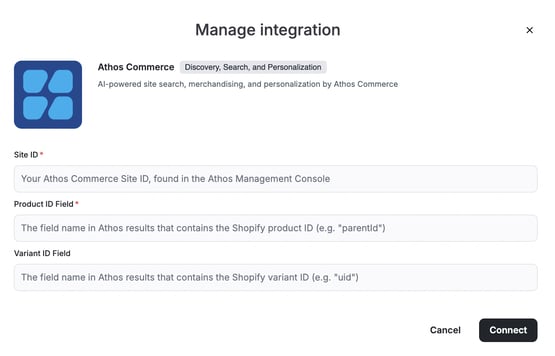
Click on the Connect button to start the setup
-
Enter the Site ID, Product ID Field and Variant ID Field
-
Click Connect
Step 2: Set Athos as Provider
-
In the Reactiv Dashboard, click your store logo to open App Settings in the App Studio.
-
Navigate to Integrations.
-
Under Discovery, Search, and Personalization, select Athos as your provider.
-
Click Save.
Once enabled, your app’s search and collections will be powered by Athos.
Next Steps
Once setup is complete, you’re all set to test your search and collections in the preview app.